
Using UNISTAT® Stand-Alone
The main advantages of using UNISTAT in stand-alone mode (i.e. when running independently of Excel) are:- it does not have the data size restrictions of Excel,
- has advanced data export / import options that are not available in Excel,
- its built-in spreadsheet (Data Processor) provides efficient data handling procedures like:
- Aggregate: compresses large data sets according to the levels of a factor variable
- Recode: assigns new values to the specified value ranges of a variable
- Stack: stacks blocks of data columns and creates an additional factor variable to keep track
- Unstack: separates blocks of data according to the levels of a factor variable
- Rank: computes ranks with ties
- MdRk: computes exact median ranks using the binomial function
- Freq: creates two new variables containing levels and frequencies of a factor variable
- Level: generates a balanced factor variable
- Dummy: generates n dummy variables for a factor variable with n levels
Spreadsheet
UNISTAT comes complete with a fully-featured Excel-like spreadsheet specialised for statistical data handling.
Data Processor can cater for different types of data such as numeric, date and time, short and long strings, missing and no-data codes.
In stand-alone mode UNISTAT has practically no limitations on the size of data files. You can handle files with millions of cases and thousands of variables. The only limiting factor is the PC’s memory. In Excel add-in mode the data capacity is limited only by Excel. The data capacity of Light Edition is limited by 50 columns and 1500 rows.
|
Advanced Data Export / Import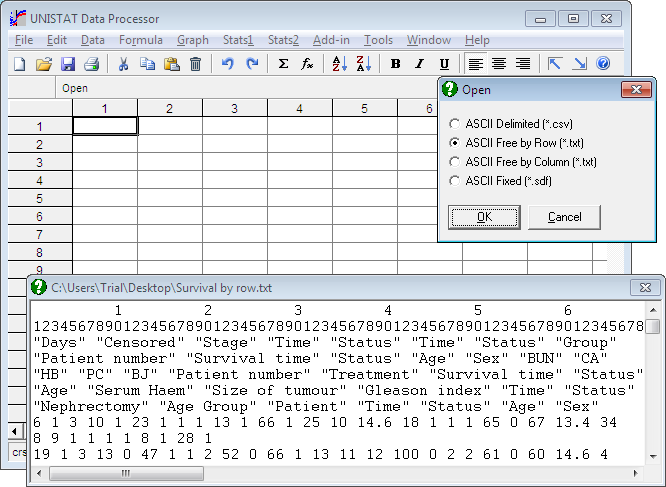
Files can be opened, merged or saved in Excel, Access, CSV and a wide range of text file formats.
In addition to the commonly used delimited text (CSV) file format, UNISTAT’s Data Processor supports ASCII by row (or by case, where the first cases of all variables are read first and then the second cases of all variables, etc.) and ASCII by column (or by variable, where all cases in the first variable are read first and then all cases in the second variable, etc.). For further information see User’s Guide section 3.1.0.5. Free Format ASCII Files.
|
ODBC and SQL
It is possible to open any database for which drivers are installed in the Windows system. It is also possible to execute SQL statements to extract subsets from large databases.
The SQL dialogue allows construction of SQL statements to select a subsample of fields and cases from a database.
|