
6.7.6. Two Proportions
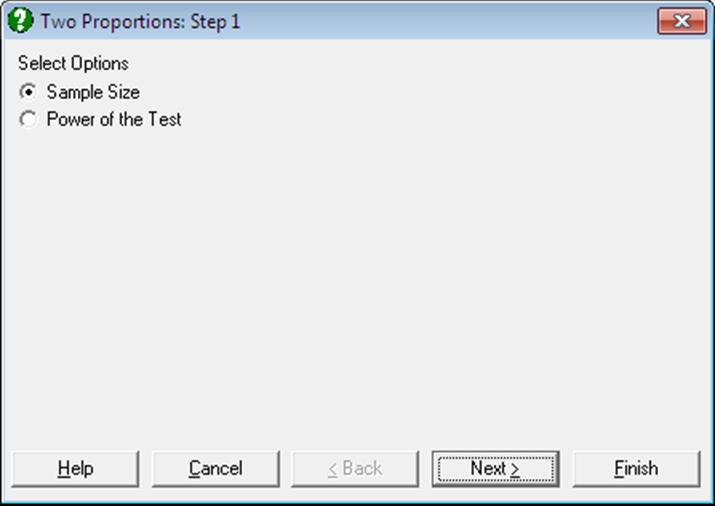
6.7.6.1. Sample Size for Two Proportions
One sample size (n1) can be estimated assuming that the ratio of the two sample sizes (r = n2/n1) is known. The algorithm for power of the test for two proportions (see next section) is also used here, employing a half-interval search method.
The user is asked to enter:
· Proportion 1
· Proportion 2
· Power of the test
· Confidence Level
· 1 or 2 tailed test
· n2/n1
and the program will output the estimated sample size (n1).
Example
Example 24.26 on p. 561 from Zar, J. H. (1999). Select Statistics 1 → Sample Size and Power Estimation → Two Proportions and the Sample Size option. Enter the following data at the next dialogue:
Sample Size and Power Estimation: Two Proportions
Sample Size
|
Proportion 1 = |
0.4500 |
|
Proportion 2 = |
0.2500 |
|
Power of the Test = |
0.9000 |
|
Confidence Level = |
0.9500 |
|
1 or 2 Tailed Test = |
2.0000 |
|
N2 / N1 = |
1.0000 |
|
Estimated Sample Size = |
127.2343 |
Next, click [Last Procedure Dialogue], enter n2 / n1 = 3 and click [Finish] again:
Sample Size and Power Estimation: Two Proportions
Sample Size
|
Proportion 1 = |
0.4500 |
|
Proportion 2 = |
0.2500 |
|
Power of the Test = |
0.9000 |
|
Confidence Level = |
0.9500 |
|
1 or 2 Tailed Test = |
2.0000 |
|
N2 / N1 = |
3.0000 |
|
Estimated Sample Size = |
83.1527 |
n2 is found as 3 x 83.1527 = 249.4581.
6.7.6.2. Power of the Test for Two Proportions
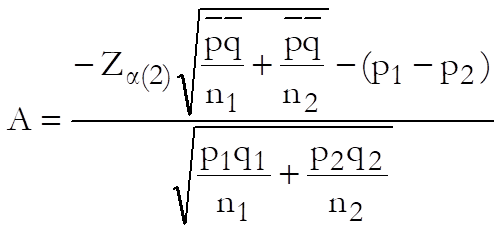
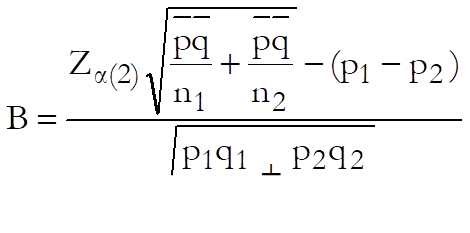
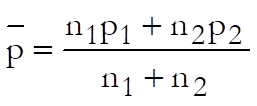
Power of the test in comparing two proportions is given by the following formula:

where:
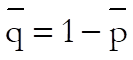
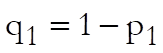
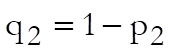
·
 is the (one or) two-tailed
critical value from the standard normal distribution for Type I error probability α.
is the (one or) two-tailed
critical value from the standard normal distribution for Type I error probability α.
The user is expected to enter:
· Sample Size 1
· Sample Size 2
· Proportion 1
· Proportion 2
· Confidence Level
· 1 or 2 tailed test
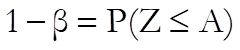
and the program will output the two Z-statistics A and B and the power of the test computed from the above equation. For a one-tailed test the power of the test is computed from:
Example
Example 24.16 on p. 554 from Zar, J. H. (2010). Select Statistics 1 → Sample Size and Power Estimation → Two Proportions and the Power of the Test option. Enter the following data at the next dialogue:
Sample Size and Power Estimation: Two Proportions
Power of the Test
|
Sample Size 1 = |
50.0000 |
|
Sample Size 2 = |
45.0000 |
|
Proportion 1 = |
0.7500 |
|
Proportion 2 = |
0.5000 |
|
Confidence Level = |
0.9500 |
|
1 or 2 Tailed Test = |
2.0000 |
|
Power of the Test: |
|
|
2-Tail Probability = |
0.6402 |